Before we get to the effective tips to create engaging LinkedIn background banners, there are many things that you should know about the platform. A positive way of thinking is to have it in mind that the people that will significantly improve your life are those you barely know or don’t know at all. You probably have already realized this from a past experience.
But what’s special about LinkedIn? The first thing to understand is that one of the key aspects of LinkedIn is relationships. It goes beyond gaining as many connections as possible but also managing them properly. Remember that the connections you make are also looking out for how you will manage them. Also, your ability to build a connection and sustain it for many years is a key area that can break or make your future.
You might already be wondering how you can maximize LinkedIn. There are so many basic things that you should know, and you’ll need to be able to remember them all at once in order to maximize the platform.
While there are so many things you should know about LinkedIn, one key thing to have in mind is that you have less than a minute to leave a good first impression with anyone you meet on the platform. LinkedIn background banners are one of the important aspects of the platform, but the sad thing is that most users don’t pay attention to them.
You’ll find so many profiles that don’t have a LinkedIn background image. Whenever a person views a LinkedIn profile, and it doesn’t have a background image, the first thing that comes to mind is that the person is inactive, and this is not a great way to build a relationship.
In this article, we’ll go through everything you should know about LinkedIn background banners, their importance, and tips to help you create engaging LinkedIn background banners. Continue reading to find out more about the platform.

What is a LinkedIn Background Banner?
A LinkedIn background banner is that image that stays at the top of your LinkedIn profile. You might want to think it’s the same as the profile picture, but there are completely different. When you add an image to your LinkedIn background banner, it will stay behind the profile picture.
It’s worth noting that one of the biggest digital assets you can give your LinkedIn profile is a LinkedIn background banner. It is in fact a very strategic way to personalize the user experience your visitors will get when they visit your profile.
We are currently in an era where everyone, including professionals, are advised to be themselves always, and on a platform like LinkedIn, LinkedIn background banners is a great way to display your personality and be yourself on the platform.

Importance of LinkedIn Background Banners
We have said so much about LinkedIn background banners, and you might already be wondering if it’s actually as important as we suggest. Basically, with LinkedIn background banners, you can comfortably blaze your career path. Remember that your LinkedIn page is like a business card that most recruiters will go through. Therefore, it’s critical to ensure that you add visuals as much as possible to your page, especially if you want to get a job offer as fast as possible.
On a business level, LinkedIn background banners are important because businesses need them to retain current talents and also recruit new ones. Word-of-mouth organic efforts for this purpose have also proven to be effective over time.
Statistics show that an average company page on LinkedIn can drive traffic of up to 800% when its employees stay engaged on the platform. In addition, the business itself will receive more job applications if this strategy is implemented.
Size and Dimensions for LinkedIn Background Banner
Now that we have established the importance of LinkedIn background banners, you might be in a hurry to create yours, but while you do that, you need to ensure that you’re doing it the correct way. There are different specs that you need to meet, and one of these specs is the size and dimensions of the LinkedIn background banner you create.
The generally recommendation for a personal page is to upload a PNG or JPG 1583 x 396 px with a 4:1 aspect ratio. To keep the result at its best, you might want to use an image that is not more than 8MB. On the other hand, for a company babe, it’s best to choose a PNG or JPEG 1128 x 191 px with a 5.91:1 aspect ratio.
How to Create an Engaging Cover Photo
Today, most of the LinkedIn background photos online actually meet the laid down requirements. However, it’s not all of them that place users in the desired working position. That is why in addition to knowing the basic requirements to meet, you also need design tips and tricks to get going.
Here are 5 tips and tricks to help you elevate your game at creating LinkedIn background banners:
1. Find Purpose and Be Yourself
The best background banners always serve their purpose to the fullest. They are not bound by location, but they are designed to make it so much easier to keep a digital presence as relevant as possible. These types of background banners don’t go out of sight after a short time.
Regardless of the purpose that you are creating the LinkedIn background banner for, it’s important to be intentional about it. Therefore, whether it’s to drive conversion, raise awareness or for a short-term campaign, you need to ensure that every design is done with intent.

2. Don’t Overuse Text
We are implying that you don’t need text in your background banners. As a matter of fact, text in background banners equally delivers good results. However, the key thing to ensure is that you don’t make the background banner too wordy because this will only enlarge your file and also decrease your ability to produce high-quality images.
With that said, if you must include text in your LinkedIn background banner, then you must ensure that you keep it sweet and as short as possible. You’ll also need to try different sizes to see how they will affect the quality of the image and the size of the file.
3. Know your Channel
LinkedIn remains a unique social platform, and it’s more than just a medium to chat with friends and family. When adding background banners to your LinkedIn profile, one of the most important things to have in mind is to ensure that you use a professional image. However, you need to understand that company pages and personal pages don’t operate with the same rules.
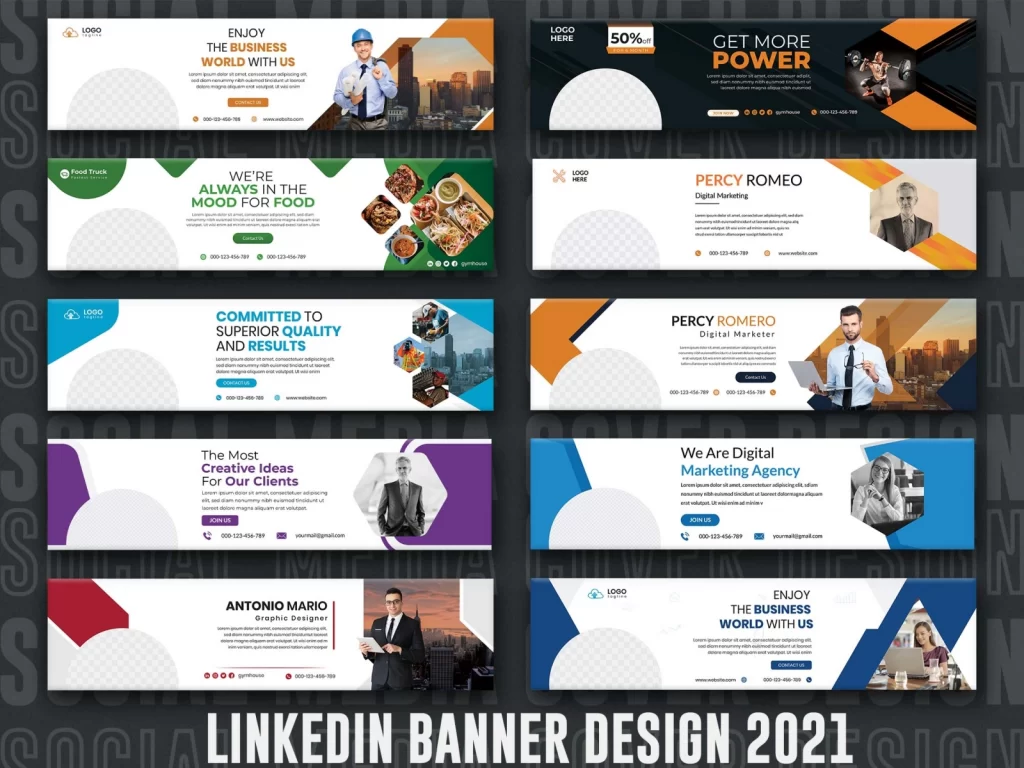
One of the common things you’ll notice with most background banners is that they mostly have a minimalistic design, and people are mostly conscious not to stack so many visual elements to the design. This is not a rule for everyone to follow, especially business owners, developers, and creatives.
With company pages, it’s better to get as loud as possible. Bold texts, infographics, and collages are the elements to consider to produce complex and amazing designs.


4. Have a Color Scheme
Colors are more important than you thought, and when you create your LinkedIn background banner, you’ll want to keep the hues on your profile coordinated. One of the safest options that people like to utilize are monochromatic color schemes. Before anything, it’s advisable to first check to confirm that your background banner and cover photo are clearly visible.
5. Stay in Shape
You might be wondering how a LinkedIn background banner can stay in shape. There are a few things you might want to consider trying. For example, one way you can present yourself as a reliable and trustworthy person is by adding triangles to your background banner. This is because triangles generally represent consistency and balance, which makes it a perfect inclusion for job candidates.
Another thing you might want to consider trying is to add circular shapes to your background banner to champion togetherness. This is a nice option or business and company pages to try. Many people don’t know that they can also use a square on their LinkedIn background banner. This is an option that you can include to keep things in shape.
Now, we have highlighted different shapes that you should consider trying, and you might be tempted to go about using just any shape you want. However, it’s important to note that you should avoid six sides, polygons, and other similar shapes. Only keep it within the options that we have provided above.
How to Make an Engaging LinkedIn Background Banner with illustAC
Now that you know the key things about background banners on LinkedIn, their specifications, as well as tips and tricks to keep things going for you. With the information we have provided above, you can proceed to make your background banner. For this, you’ll need an effective and easy-to-use tool to keep things steady. While there are so many tools available on the market today, we recommend using illustAC, and we’ll take you through the easy processes involved.
With illustAC, you can easily customize different LinkedIn background banner templates according to your taste. Alternatively, you might want to create your own background banner from scratch, which is also possible with the platform.
Here’s the quick step to follow to create background banners using illustAC:
- The first thing to do is to visit illustAC and search for a background banner template that you can use on your LinkedIn profile.
- With the search bar, you can easily find different templates that you can use.
- Before you download the template, you can customize it and make changes according to your preference.
- By clicking on the edit option, you can easily add text, borders, graphics, images, and colors.
- After editing the template, you can proceed to download and export the LinkedIn background banner. You can do this in different file formats, but the most common is PDF, PNG, and JPEG.
How to Change your LinkedIn Background Banner
Now that you have successfully created a background banner for your LinkedIn profile, the next thing you want to do is to upload it to your LinkedIn Page. If you don’t know how to do this, here are some steps to guide you through:
- Login to your LinkedIn account and head to your profile page
- Select the pencil icon that appears at the top right corner of your page so you can access the photo upload box
- Click on upload photo
- Select the image you created, or your preferred image
- Be sure to customize the image and make a few changes. This includes zoom, adjust, filter, and crop. There are other editable features that you might want to consider changing.
- Once you are done editing the image, you can then click on apply, and you’re all set.
If you’re not sure about the type of image to upload on your LinkedIn background banner, you might also want to consider checking different photo libraries for options that you can use. This is an ideal option for business pages and companies. If you can’t find any nice image to use for your company page, you have nothing to worry about because there are many websites that you can check.
One of the websites to consider is illustAC which we already mentioned above for creating these background banners. In addition to that, you can also get premade banners to use on your LinkedIn page. From images to vectors, illustrations, logos, and different banners, you can rest assured that you’ll find something beautiful to use on illustAC.